
AI Studio
AI Studio
DataDios AI Studio offers a text-based interface to interact with any data source, eliminating the need for users to know various SQL syntaxes. Additionally, DataDios AI Studio automatically generates rich visual interfaces for queried data, which can be exported or emailed.
Universal Semantic Search
The DataDios platform provides a universal full-text and semantic search capability, enabling searches across metadata, governance data, data quality rules, and performance data.
Workload Analyzer
Workload Analyzer
Access all your data in one location and use an intuitive text-based chatbot to answer all your data-related questions.
SmartDiff
SmartDiff
SmartDiff ensures an easy, efficient, and secure way to validate migrated data across private and public cloud platforms. DataDios SmartDiff is built on Root Cause Analysis, Clustering and Data Transformation architecture enables automated Data Validation Post Migrations, Cause analysis and revealing the patterns.
Data Explorer
Data Explorer
Connect to any supported data source, and DataDios Data Explorer will instantly visualize metadata, operational data, governance data, and performance data—all in one place.
Metadata Synchronization
Metadata synchronization is important in distributed computing environments where data is stored and processed across multiple systems or in cutting edge technologies . In such environments, ensuring consistent metadata across all nodes is essential for enabling efficient data access, querying, and processing.
Meta Vision
Meta Vision
Connects instantly to any data source using the in-built data source implementation support. Works well with any database schema and connects using well defined REST API web services. Capable of Data Exploration, Data Migration and Data Synchronization from a single UI.
Data Quality Dashboard
Simply export the data from any data source in seconds. Users get the option to export as PDFs, Excel spreadsheets or CSV.
AI Studio Icon
Data Explorer
Connect to any supported data source, and DataDios Data Explorer will instantly visualize metadata, operational data, governance data, and performance data—all in one place.
How It Works
Data Source Connectivity

Data Source Connectivity

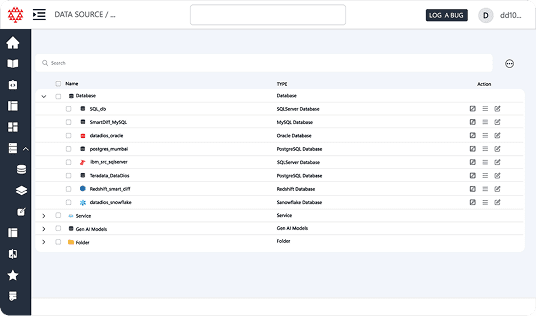
Connect to a wide range of data sources, including databases (like MySQL, PostgreSQL, SQL Server), spreadsheets (like Excel, CSV), cloud storage (like Amazon S3, Google Cloud Storage), and more.

Data Exploration

Data Exploration

Easily browse and explore the structure of your data, including tables, columns, and relationships. The Data Explorer provides an intuitive interface to help you understand your data better, making it easier to analyze and extract insights. The data is often presented in a hierarchical structure, such as a tree view, to visualize the relationships between different components.
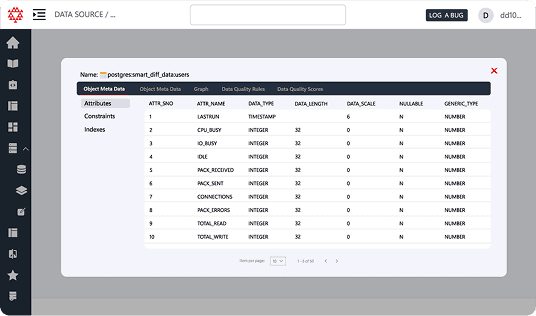
Table Metadata

Table Metadata

Table metadata provides essential information about the columns & keys in your table, helping users understand the data structure and context without delving into the actual data. Each column in a table is described with its name, data type (e.g., integer, string, date), and a brief description of what data it contains.
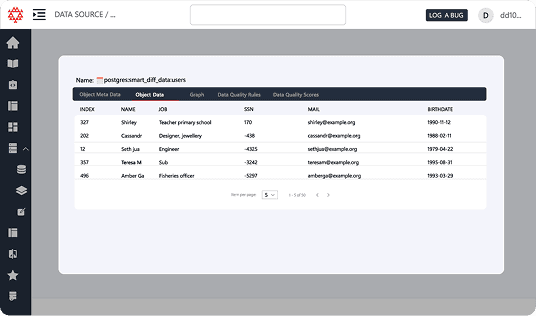
Table Data

Table Data

Table Data presents the actual records contained within the tables, allowing users to view, filter, and analyze the information directly. A clean, interactive grid that displays all rows and columns of data. Users can navigate through large datasets easily, viewing a set number of rows per page.
Relationship Graph

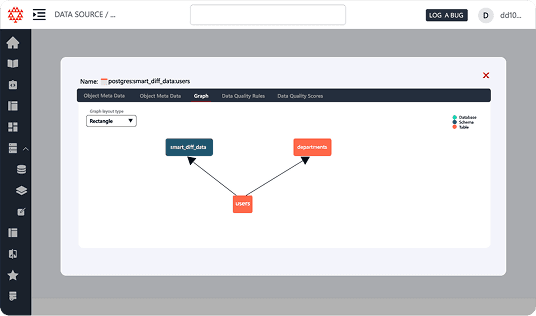
Relationship Graph

Table Relationships provide insights into how different tables within the dataset are related, illustrating the connections between various tables at the database level. Entity-Relationship Diagrams (ERD) Visual representations of table relationships, showing how tables link to each other (e.g., primary and foreign keys).

Benefits

End-to-End Migration Optimization

Streamline data migration with root cause analysis, clustering, and a powerful data transformation architecture — a one-stop solution to identify and fix data problems.

Guided & Intuitive Validation Experience

Easy-to-use, wizard-like experience for post-migration data validation with a simple and intuitive graphical user interface (GUI).

Seamless Data Connectivity

Connect various data sources and files effortlessly for validation.

Intelligent Pattern Detection

Understand data issue patterns using advanced clustering mechanisms.

Targeted Metadata Validation

Speed up the migration process with focused validation through metadata filtering.

Flexible Data Transformation

Increase flexibility by applying data transformation rules and metadata filtering.

Proven Validation Performance

Benefit from one of the industry’s highest success rates in data validation.

Parallel Job Execution

Run multiple validation jobs simultaneously to reduce migration time.

SmartDiff Acceleration

Accelerate validation of large and complex migrated data using SmartDiff technology.

Features

Cloud Connectivity

Seamless AWS IntegrationConnect directly to AWS services to access data stored in various AWS resources, such as Amazon S3, RDS, and Redshift.
Azure ConnectivityEasily connect to Azure services to explore data from Azure Blob Storage, Azure SQL Database, and other Azure data sources.

Instance Management

Start and Stop InstancesUsers can easily start and stop cloud instances directly from the Data Explorer, providing flexibility in resource management.
Instance Status MonitoringReal-time monitoring of the status of AWS and Azure instances, helping users manage resources effectively.

Cost Monitoring and Management

Cost Analysis DashboardView real-time cost data for resources within AWS and Azure, allowing users to monitor expenses effectively.
Budget AlertsSet alerts for budget thresholds to avoid unexpected costs, ensuring users stay within their financial limits.

Export Functionality

Data and Report ExportUsers can export data visualizations and reports in various formats (e.g., CSV, PDF) for sharing or presentations.
Frequently Asked Questions
What is DataDios Data Explorer?

DataDios Data Explorer is a centralized interface that connects to supported data sources and instantly visualizes metadata, operational data, governance data, performance data, and even LLMs all in one place. It helps users understand, explore, and manage their datasets without switching between multiple tools.

What are the main benefits of using Data Explorer?
How does Data Explorer help with centralized data management?
How does Data Explorer connect to different data sources?
How does Data Explorer make data exploration easier?
What is table metadata in Data Explorer and why is it important?
How does understanding relationships in Data Explorer improve querying?
How can users work with actual table data in Data Explorer?
Which data sources does Data Explorer support?
What is the Relationship Graph in Data Explorer?
How does Data Explorer support cloud connectivity?
How does Data Explorer help with cost monitoring and management?
What instance management capabilities does Data Explorer provide?
Can users export data and reports from Data Explorer?
How does Data Explorer support data governance?