
Data Explorer
Connect to any supported data source, and DataDios Data Explorer will instantly visualize metadata, operational data, governance data, and performance data—all in one place.

Centralized Data Management
Visualize data, metadata, governance data, performance data and LLMs.

50+ data sources
Support are including popular cloud services (AWS, Azure, Google Cloud), databases (SQL, NoSQL), and file systems.
How It Works
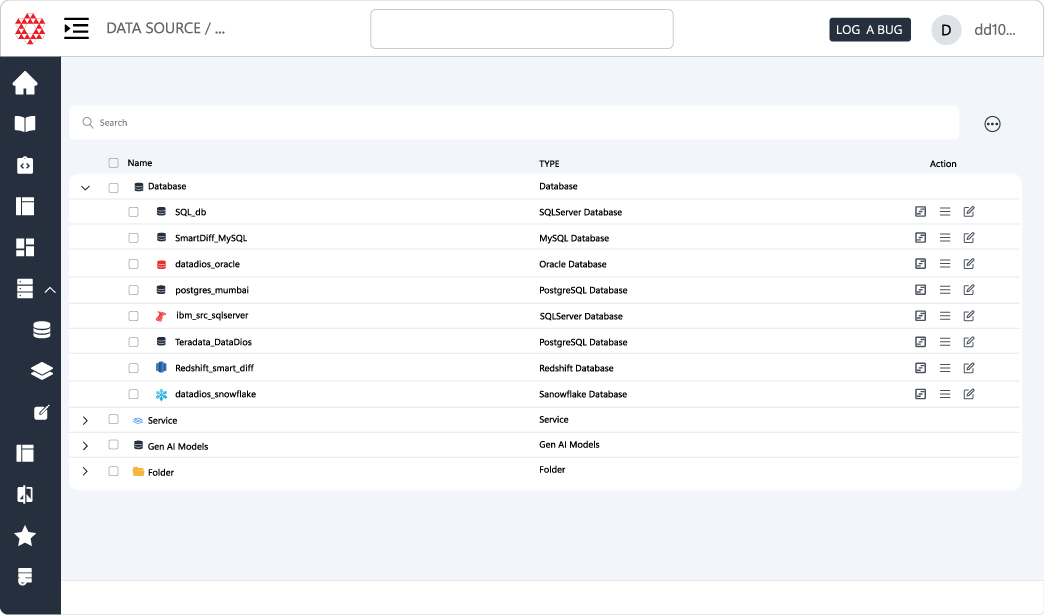

Data Source Connectivity
Connect to a wide range of data sources, including databases (like MySQL, PostgreSQL, SQL Server), spreadsheets (like Excel, CSV), cloud storage (like Amazon S3, Google Cloud Storage), and more.
Data Exploration
Easily browse and explore the structure of your data, including tables, columns, and relationships. The Data Explorer provides an intuitive interface to help you understand your data better, making it easier to analyze and extract insights. The data is often presented in a hierarchical structure, such as a tree view, to visualize the relationships between different components.
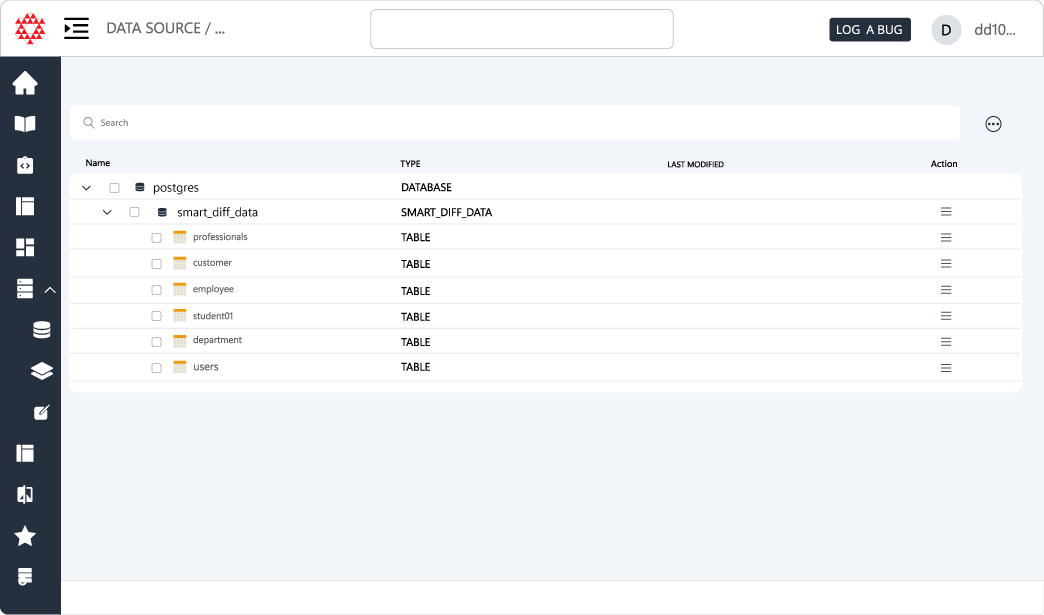
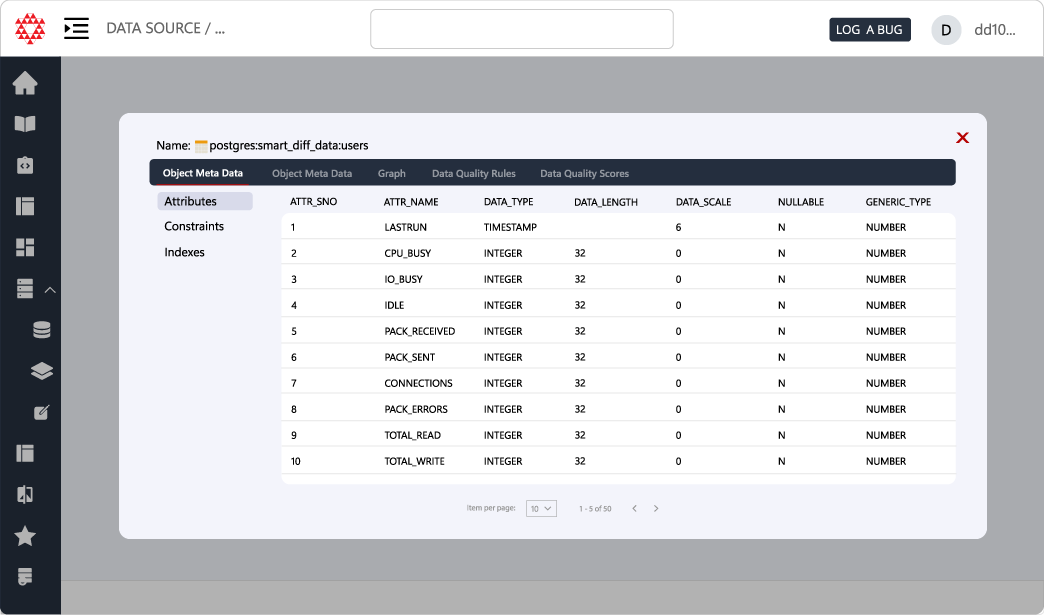
Table Metadata
Table metadata provides essential information about the columns & keys in your table, helping users understand the data structure and context without delving into the actual data. Each column in a table is described with its name, data type (e.g., integer, string, date), and a brief description of what data it contains.
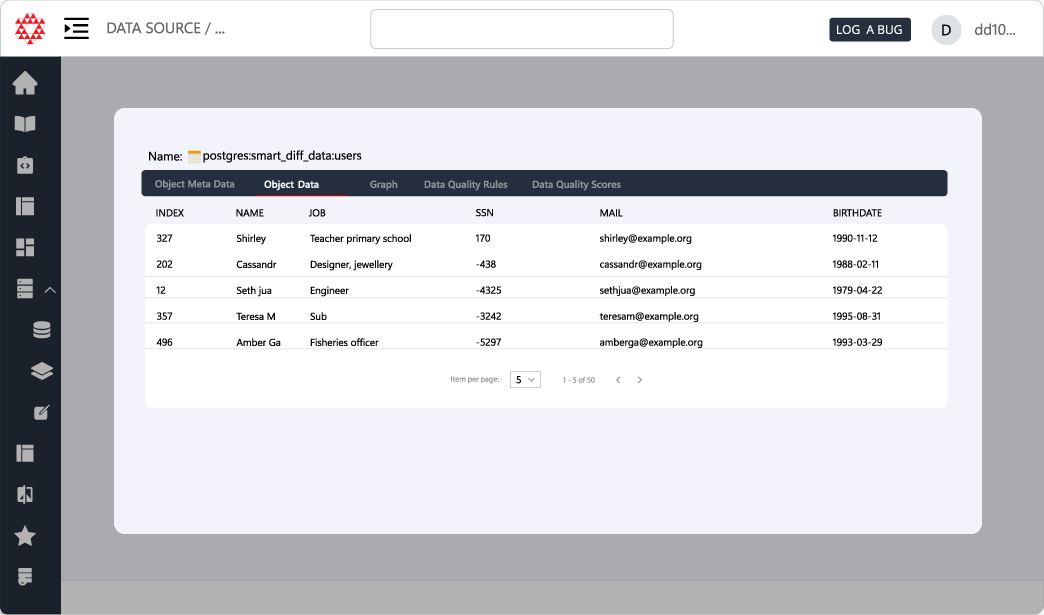
Table Data
Table Data presents the actual records contained within the tables, allowing users to view, filter, and analyze the information directly. A clean, interactive grid that displays all rows and columns of data. Users can navigate through large datasets easily, viewing a set number of rows per page.
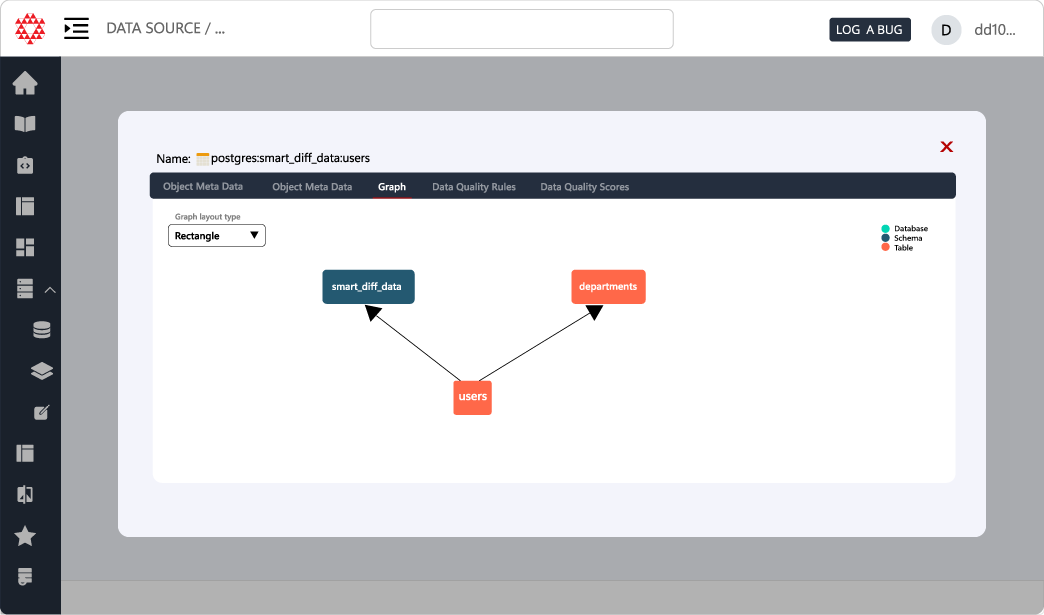
Relationship Graph
Table Relationships provide insights into how different tables within the dataset are related, illustrating the connections between various tables at the database level. Entity-Relationship Diagrams (ERD) Visual representations of table relationships, showing how tables link to each other (e.g., primary and foreign keys).
Benefits
Enhanced Understanding
Users can quickly grasp the structure and context of their data without looking at every entry.
Improved Data Quality
By examining metadata, users can identify potential issues with data types or missing descriptions.
Interactive Analysis
Users can engage with the data dynamically, helping them identify trends or anomalies quickly.
Holistic View
Users gain a comprehensive understanding of the dataset’s structure and how different pieces of information relate.
Improved Querying
Understanding relationships assists users in constructing effective queries to extract meaningful insights.
Efficient Data Joining
Knowledge of keys allows users to construct effective queries to join tables, facilitating more complex analyses and enabling users to pull comprehensive reports that combine multiple data sources.
Data Accessibility
Users can access large datasets with ease through features like pagination and search, ensuring they can work with the specific data they need without being overwhelmed.
Facilitates Data Governance
Well-defined metadata helps organizations maintain data governance practices by providing clear definitions and standards. This ensures consistency across datasets, which is essential for regulatory compliance.
Features
Cloud Connectivity
-
Seamless AWS Integration: Connect directly to AWS services to access data stored in various AWS resources, such as Amazon S3, RDS, and Redshift.
-
Azure Connectivity: Easily connect to Azure services to explore data from Azure Blob Storage, Azure SQL Database, and other Azure data sources.
Cost Monitoring and Management
- Cost Analysis Dashboard: View real-time cost data for resources within AWS and Azure, allowing users to monitor expenses effectively.
- Budget Alerts: Set alerts for budget thresholds to avoid unexpected costs, ensuring users stay within their financial limits.
Instance Management
-
Start and Stop Instances: Users can easily start and stop cloud instances directly from the Data Explorer, providing flexibility in resource management.
-
Instance Status Monitoring: Real-time monitoring of the status of AWS and Azure instances, helping users manage resources effectively.
Export Functionality
Users can export data visualizations and reports in various formats (e.g., CSV, PDF) for sharing or presentations.
FAQs
What is DataDios Data Explorer?
DataDios Data Explorer is a centralized interface that connects to supported data sources and instantly visualizes metadata, operational data, governance data, performance data, and even LLMs all in one place. It helps users understand, explore, and manage their datasets without switching between multiple tools.
How does Data Explorer help with centralized data management?
Data Explorer brings together data, metadata, governance information, performance metrics, and LLM-related assets in a single view. This centralized data management makes it easier to see how everything fits together and supports consistent analysis, governance, and reporting across your environment.
Which data sources does Data Explorer support?
Data Explorer supports 50+ data sources, including popular cloud services like AWS, Azure, and Google Cloud; relational and NoSQL databases; spreadsheets such as Excel and CSV; and file systems like Amazon S3 and Google Cloud Storage.
How does Data Explorer connect to different data sources?
Through Data Source Connectivity, Data Explorer lets you connect to a wide range of systems, including databases (MySQL, PostgreSQL, SQL Server), spreadsheets, and cloud storage platforms. Once connected, it automatically surfaces their structures and metadata for exploration.
How does Data Explorer make data exploration easier?
Data Explorer provides an intuitive interface often using hierarchical or tree views to browse tables, columns, and relationships. This visual approach helps users quickly understand the shape of their data, making it easier to analyze, design models, and extract insights.
What is table metadata in Data Explorer and why is it important?
Table metadata in Data Explorer describes the structure and context of a table, including column names, data types, keys, and brief descriptions. It helps users understand what each column represents without needing to inspect every row of data, improving comprehension and data quality.
How can users work with actual table data in Data Explorer?
Table Data in Data Explorer presents the actual records from a table in a clean, interactive grid. Users can view, filter, and navigate large datasets using pagination and search, focusing on the specific rows and columns they need for analysis.
What is the Relationship Graph in Data Explorer?
The Relationship Graph shows how tables are connected at the database level. It uses Entity-Relationship Diagrams (ERDs) to visualize primary keys, foreign keys, and other links, giving users a clear picture of how different tables relate to each other.
How does understanding relationships in Data Explorer improve querying?
By visualizing table relationships and keys, Data Explorer helps users construct more effective queries and joins. This leads to more accurate analyses, comprehensive reports that combine multiple tables, and fewer errors when building complex SQL.
What are the main benefits of using Data Explorer?
Data Explorer enhances understanding of data structures, improves data quality by highlighting metadata gaps, and supports interactive analysis through dynamic grids and visualizations. It provides a holistic view of how data pieces fit together, improving querying, data joining, accessibility, and governance.
How does Data Explorer support cloud connectivity?
Data Explorer integrates directly with cloud services, offering seamless connectivity to AWS, Azure, and other platforms. You can explore data stored in services like Amazon S3, RDS, Redshift, Azure Blob Storage, and Azure SQL Database from a single interface.
How does Data Explorer help with cost monitoring and management?
Data Explorer includes cost analysis dashboards for AWS and Azure that show real-time cost data. Users can monitor spending, set budget alerts for thresholds, and avoid unexpected bills by keeping costs visible as part of their day-to-day data exploration.
What instance management capabilities does Data Explorer provide?
Within Data Explorer, users can start and stop cloud instances (such as those in AWS or Azure) and monitor their status in real time. This makes it easier to align compute resources with actual usage and optimize cloud costs.
Can users export data and reports from Data Explorer?
Yes. Data Explorer allows users to export data visualizations and reports in formats like CSV and PDF. This makes it simple to share findings, include visuals in presentations, or move data into other tools for further analysis.
How does Data Explorer support data governance?
By providing well-defined metadata and clear definitions for tables, columns, and relationships, Data Explorer helps organizations maintain strong data governance practices. This consistency supports regulatory compliance and ensures that teams use data according to shared standards.